Limited-time 50% off · Unlimited generation with Seedream, MiniMax H3 on selected plansNew: free AI video · MiniMax H3 Turbo, no sign-up needed

Claim offerTry it free
RaphaelRaphael AI
Create
AI Image
AI Video
AI Models
RaphaelRaphael AI

SEEDREAM 5.5 Prompts

Prompts

15 community examples · try the prompts in your language

AI Enhance
0 / 2,000
Reference Images (Optional)
0 / 2,000
AI Enhance
Model
Aspect Ratio
Output Number
Resolution
Background
Output Format
  • Realistic photography
  • Text and typography
  • Transparent PNG output
  • Targeted image editing

Transparent assets prompts

Total 5
All 15Text & typography 6Transparent assets 5Photography & documentary 3Multi-turn & targeted editing 1
Transparent assetsCommunity

Glass jellyfish lamp

@ahmetmertugrul

Transparent background, PNG with alpha channel. A hand-blown glass jellyfish lamp floating in mid-air: semi-transparent frosted bell with visible internal air bubbles, long trailing tentacles made of thin glass threads that fade from fully opaque at the top to almost invisible at the tips, a faint warm amber glow inside the bell, soft caustic refractions, wisps of translucent steam drifting from the tentacle ends. No background, no ground shadow, clean anti-aliased edges, studio product lighting.

Transparent assetsCommunity

Streetwear cutout

@Dheepanratnam

Full-body cut-out asset of a stylish young Black male streetwear model wearing an oversized charcoal puffer jacket, baggy denim jeans and white trainers, walking casually. Fully transparent background with native alpha channel, precise edges around curly hair, jacket fibres, shoelaces and fingers, no background remnants, no halo, no clipped limbs. Natural stance, studio-quality lighting from front left, suitable for compositing into a fashion campaign.

Transparent assetsCommunity

Frosted acrylic sheet

@Dheepanratnam

PNG asset of a hand holding a clear acrylic sheet with a subtle frosted edge, photographed straight on. The acrylic sheet must have realistic partial transparency, visible refraction and a soft translucent gradient, while the hand and fingers remain fully opaque. Native alpha channel, clean anti-aliased edges, no background, no colour contamination, no harsh cut-out edges. Premium UI/design asset, centred composition.

Transparent assetsCommunity

Chrome ribbon logo

@Dheepanratnam

Transparent PNG asset of a floating 3D chrome ribbon logo shape, elegantly twisted like liquid metal, with realistic specular highlights and soft internal reflections. Fully transparent background, native alpha channel, crisp edges around every curve, no background glow, no rectangular bounding artefacts, no drop shadow baked in. Minimal premium brand asset, centred, suitable for overlaying on video or web design.

Transparent assetsCommunity

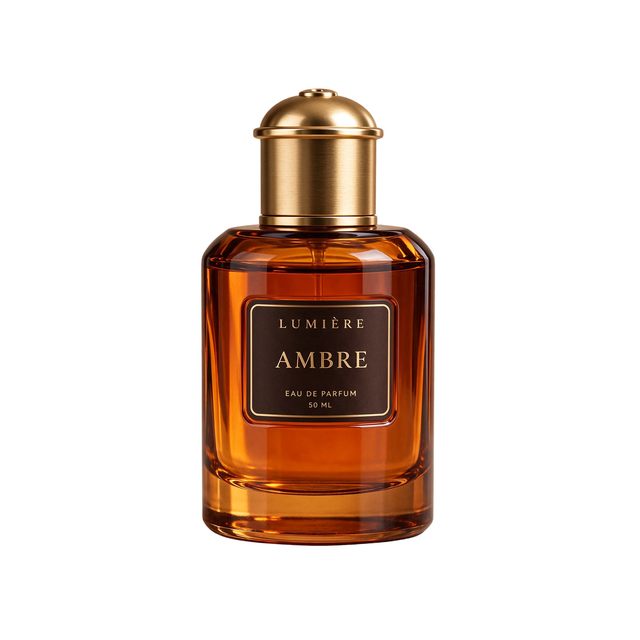
Amber perfume cutout

@Dheepanratnam

Studio product asset of a translucent amber glass perfume bottle with a brushed-gold cap, floating centred in the frame. Fully transparent background with native alpha channel, clean accurate edges around the glass, cap and reflections, no background colour bleed, no white halo, no cut-off shadows. Preserve realistic glass refraction and internal liquid. Commercial e-commerce asset, front-facing composition, high detail, suitable for direct placement onto any design background.

How to use Seedream 5.5 prompts

Browse 15 community examples with source-published prompts. The images are credited previews; they have not been independently reproduced by Raphael.

Use the examples to see how a prompt specifies composition, wording or an edit. Start with the original, then adjust the details to suit your image.

Try a prompt in the generator

Select Try now to fill the generator with the prompt you are viewing. Review it and add an image for an edit before generating.

Go to generator →

Seedream 5.5 prompts FAQ

What to know before trying an example.

1

Can I see the original prompt?

Yes. Open a case and choose View original. If a prompt specifies text that should appear in the image, that text stays exactly as written in every language.

2

Will I get the same result as the preview?

Results can vary with the input, settings and generation. The previews illustrate what the original authors reported.

3

How do I create a transparent image?

Choose Transparent in the generator to request a PNG with an alpha channel. Gallery thumbnails are previews, so they may show the background flattened.

4

What if a prompt needs an original image?

An edit needs an input image. If the source has not supplied the original, upload an image you want to edit before generating.

More tools

  • AI Image Generator
  • Text to Image
  • Image to Image
  • AI GIF Generator
  • AI SVG Generator
  • AI Infographic Generator
  • AI Image Editor
  • AI Local Image Editor
  • AI Background Remover
  • AI Watermark Remover
  • AI Image Upscaler
  • AI Image Extender
  • AI Video Generator
  • GPT Image 2.6 Sunburst
  • GPT Image 2.6 Flare
  • GPT Image 2.5
  • Grok Imagine Image 2.0
  • Nano Banana 2.1
  • Nano Banana Pro
  • Seedream 5.5 image generator
  • Seedream 5.0 Pro
  • Seedream 5.0 Flash
  • Seedance 2.5 Video Generator
  • Wan 3.0
  • MiniMax H3
  • All Image Tools
  • All AI Models

Create with Seedream 5.5

Pick a prompt you like and try it as is, or tweak the details first.

Go to generator →