
Kling 4.0 AI Video Generator
Create image-to-video clips with Kling 4.0 using first and last frames, middle keyframes and multimodal references.
Kling 4.0 supports text to video and image to video. Set first and last frames plus up to 8 middle keyframes, or guide generation with image, video and audio references. Create 3–30 second clips at 720p or 1080p.
AI Enhance
0 / 3,000
Reference Images (Optional)
0 / 3,000
AI Enhance
Model
Aspect Ratio
Output Number
Resolution
Quality
Output Format
Fast
Loading video models...
Kling 4.0 Video Examples
Supports complex motion, continuous storytelling up to 30 seconds and a range of visual styles.
Official Kling 4.0 example
Action in a Hotel Lobby
Suggested prompt (not the original)
Kling 4.0 Features
Use keyframe control and multimodal references to create videos up to 30 seconds long.
Official Kling 4.0 example

Character Motion and Camera Continuity
Follow character movement and action with the camera while keeping subject positions, spatial relationships and sound coherent.
Official Kling 4.0 example

Multimodal Reference Control
Use image, video and audio references to guide characters, movement and settings when creating scenes with multiple elements.
Official Kling 4.0 example

Up to 30 Seconds of Continuous Storytelling
Create up to 30 seconds in one video, with room for subject movement, camera transitions and setting changes to unfold continuously.
Official Kling 4.0 example
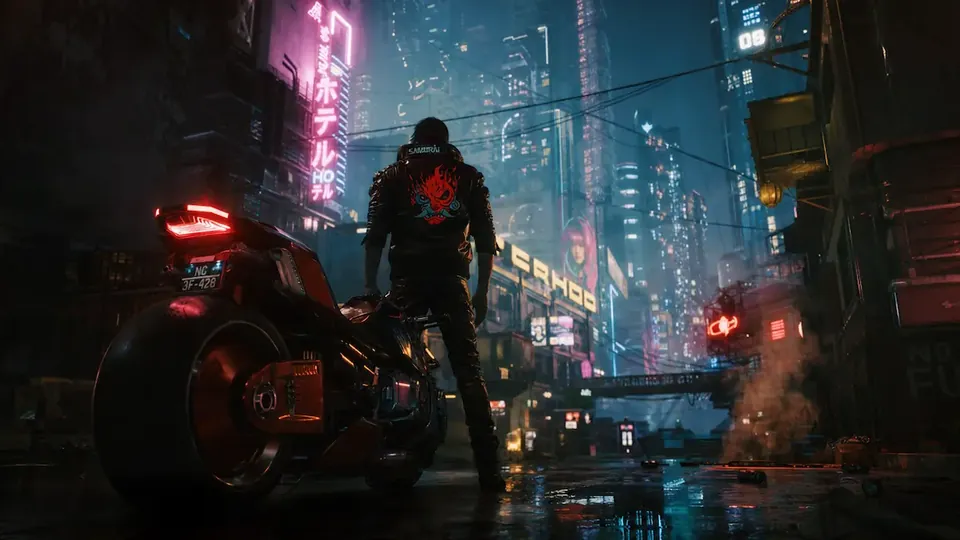
Versatile Visual Styles
Render night scenes, neon and reflections with varied materials and layered visual detail under complex lighting.
 NEW
Kling 4.0 Flash
3–20 second 720p video from text, one image, or references.
 -60%
Wan 3.0
Multimodal video up to 30 seconds, with optional sound.
 -60%
Wan 3.0 Prime
Faster multimodal video, up to 30 seconds.

Gemini Omni Flash
720p video from text, one image, or 1–6 reference images.

MiniMax H3
2K video with native stereo audio and multimodal references.

Seedance 2.5
Up to 30 seconds with multimodal references and native audio.
Compare Kling Video Models
Choose the right Kling video model based on image quality, image input, audio, and generation speed.
| Feature | Kling 3.0 | Kling 3.0 Turbo | Kling 4.0 | Kling 4.0 Flash |
|---|---|---|---|---|
| Resolution | 720p / 1080p / 4K | 720p / 1080p | 720p / 1080p | 720p |
| Duration | 3–15 seconds | 3–15 seconds | 3–30s | 3–20s |
| Image to video | Up to 2 images | 1 first frame | First, last, and up to 8 middle keyframes | One first frame |
| References | — | — | Images, videos, audio; 15 total | Images, videos; 15 total |
| Native Audio | Yes | No | Yes | Yes |
| Standard credits/sec | No sound: 31/41/153 | 41/51 | 50/75 | 30 |
| Video reference credits/billed sec | — | — | 30/45 | 20 |
Select a model to see available settings and the credit quote before generating.

Choose Your Plan
Free images include a watermark. Upgrade for clean outputs, faster generation, and commercial use.
Kling 4.0 FAQ
Learn about inputs, duration, audio and batch generation.
1
How do I create an image-to-video clip with Kling 4.0?
Upload a first-frame image, then optionally set a last frame and up to 8 middle keyframes to control visual moments in the video.
2
Does Kling 4.0 support text-to-video generation?
Yes. Describe the scene, action and camera without uploading an image. Choose a duration from 3 to 30 seconds and 720p or 1080p output.
3
How do keyframes differ from reference generation?
Keyframes define moments on the timeline: a first frame, a last frame and up to 8 middle keyframes. Reference generation uses images, videos or audio to guide subjects, motion and style. The modes cannot be combined in one request.
4
Which durations and resolutions does Kling 4.0 support?
Generate 3–30 seconds per clip in one-second steps, at either 720p or 1080p.
5
Can I turn off audio in Kling 4.0 videos?
There is no audio-off option. With reference video, choose regenerated sound or keep the first video's original audio.
6
How many Kling 4.0 videos can I generate at once?
Choose 1–4 videos. Each is submitted as a separate request, and the combined credit quote appears before generation.